The employment application is split up into two sections:
- Job Listings
- Application Submissions
Job Listings
The job listings section is located in the “Employment” tab on the sidebar. It behaves much like the other content areas of the site.
To add a position to the site, follow these steps, remembering that every field does not have to be filled:
- Browse to the admin section of the site.
- Select Employment from the sidebar.
- Press the “Add New” button next to the title, or click “Add New” straight from the sidebar.
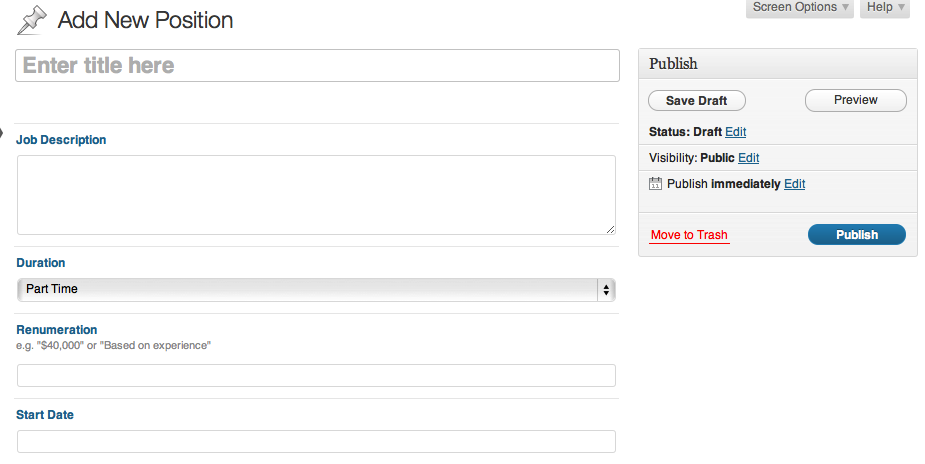
- Fill in the Title, use the job title here.
- Fill in the description in the content area provided.
- Select a jobs permanency in the Duration field.
- Fill in a renumeration value, may be numbers or words.
- Add a start date if applicable.
- Press the blue “Publish” button from the Publish area to the right to save your listing.
Editing an existing listing
To edit existing listings:
- Browse to the admin section of the site.
- Select listings from the sidebar.
- In the list of existing listings that appears, click on the title of the listing that you wish to edit. You will be taken to the editing screen for that listing.
- Modify any of the content that you desire.
- Press the blue “Publish” button from the Publish area to the right.
Removing existing listings
Removing listings is the same as removing any other content type on the site:
- Browse to the admin section of the site.
- Select listings from the sidebar.
- Hover over the listing you wish to remove.
- Press the red “Trash” button.
Application Submissions
The application submissions are handled by the same form system as the contact form and any other submission based forms on the site.
You will automatically be forwarded the entries when they are submitted, though you can view all the submissions at once from the “Forms” > “Entries” section, then selecting the Employment Application form.